September 6, 2026 · Coreventra
Six Steps to Roll Out Shopify ERP Integration for Ops Teams
Illustrative photo.
Six Steps to Roll Out Shopify ERP Integration for Ops Teams
For most merchants, a certified connector or iPaaS delivers the fastest, lowest-risk path to syncing Shopify with an ERP; custom builds are worth the extra cost only for high-volume or heavily customized workflows. Either route should produce two quick wins: fewer oversells thanks to accurate inventory counts, and far less manual reconciliation between order data and your books. Start by scoping requirements and mapping your core business rules before you touch a single connector.
**TL;DR:**
Certified connectors are quickest and most cost-effective for low to moderate volumes, while custom builds are reserved for complex workflows or high orders.
Accurate inventory synchronization reduces oversells and refunds, resulting in faster fulfillment and labor savings, especially when manually reconciling is costly.
Proper planning involves thorough discovery, mapping, testing, and phased rollout to prevent scope creep and avoid costly rework later.
Maintaining integration health requires ongoing monitoring of success rates, error types, and timely alerting, with provisions for re-trying failed syncs.
Partner-led development is advisable when internal engineering resources are limited or when business rules are too specific for generic connectors.
What does ERP integration mean for a commerce team?
An ERP integration connects Shopify, your storefront and point-of-sale layer, to the system that actually runs your business: inventory counts, purchase orders, accounting, and fulfillment logic. Shopify is where customers buy. The ERP is where the business keeps score.
Where this connection lives in your stack depends on how much transformation the data needs before it lands in each system. Shopify's own enterprise guide on ERP integration lays out four basic methods: native connectors, direct API calls, middleware/iPaaS platforms, and fully custom builds. Each sits at a different point between "install an app" and "hire developers."
Not every merchant needs this. A single-location store running under a few hundred orders a month can often manage on Shopify alone, using its built-in inventory tools and a spreadsheet for accounting. The calculus changes once you add:
Multiple sales channels or warehouses that need one shared inventory count
Wholesale or B2B pricing rules that live in the ERP, not Shopify
Order volume high enough that manual entry into accounting software becomes a full-time job
Compliance or reporting requirements that demand a single system of record
If none of those apply yet, hold off. Integration work is easiest to justify when manual reconciliation is already costing real hours every week.
What operational benefits come from connecting Shopify and an ERP?
The headline benefit is inventory accuracy. When Shopify and your ERP share one truth about stock levels, oversells drop and so do the refunds and support tickets that come with them. That single change often pays for the integration project on its own within a couple of sales cycles.
Beyond stock counts, a working integration typically delivers:
Faster fulfillment, because warehouse and 3PL systems get order data the moment it's placed, not hours later
Fewer fulfillment exceptions, since address, SKU, and inventory mismatches get caught before a pick ticket prints
Automated accounting entries, so invoices, tax, and revenue postings happen without a bookkeeper re-typing order details
Real labour savings, since staff stop reconciling two systems by hand every night
Pro Tip: Track your manual reconciliation hours for two weeks before you scope the project. That number becomes your baseline for measuring the integration's return once it's live, and it's far more persuasive to a finance team than a vague "efficiency" claim.
None of this happens automatically once you flip a connector on. Shopify's guidance stresses confirming that a connector actually supports the data objects and sync behaviour your specific ERP needs before you commit to it. A connector that syncs orders but not fulfillment status back to Shopify will leave you doing half the manual work you were trying to eliminate.
Connector, iPaaS, or custom build: which fits your business?
Three approaches dominate real-world Shopify ERP setups, and the right one depends on volume, how unusual your business rules are, and how much engineering time you actually have on staff.
Certified app connectors. These are pre-built, vendor-maintained apps that handle a defined set of data objects between Shopify and specific ERP platforms. They're the fastest to deploy and the cheapest to run, largely because there's no separate system to maintain. Shopify's Global ERP Program exists specifically to certify these connectors, which reduces the custom engineering work and the risk that comes with it.
iPaaS or middleware platforms. These sit between Shopify and your ERP, transforming data and orchestrating multiple endpoints, useful when you're syncing to more than just an ERP (a 3PL, a tax engine, a CRM). The tradeoff is that middleware becomes its own system to secure and maintain. Industry commentary on this "third-system trap" points out that embedded, native integrations often lower total cost of ownership precisely because they avoid adding that extra platform.
Custom API-led builds. Reserved for genuinely unusual business logic (multi-warehouse pick rules, non-standard pricing tiers, an ERP with no certified connector) or extremely high order volume where off-the-shelf tools choke on rate limits. Custom builds cost more upfront and require ongoing developer attention, but they're the only option when your workflow simply doesn't match what a packaged connector was designed to do.
Run through this checklist before choosing:
Order volume: hundreds a month favours a connector; thousands a day starts to demand middleware or custom queuing.
Custom business rules: heavy customization (tiered B2B pricing, complex bundling) pushes you toward custom or highly configurable middleware.
Number of endpoints: syncing to just the ERP favours a connector; syncing to the ERP plus a 3PL plus a tax platform favours iPaaS.
Internal engineering capacity: no in-house developers means a connector or a partner-led build, not a DIY custom project.
For high-volume or unusually complex order workflows, Swishtag's implementation guide makes the same point from the other direction: middleware or custom builds become necessary specifically because they can handle data transformations, retries, and idempotent writes that simple connectors weren't built for.
What data should sync between Shopify and your ERP?
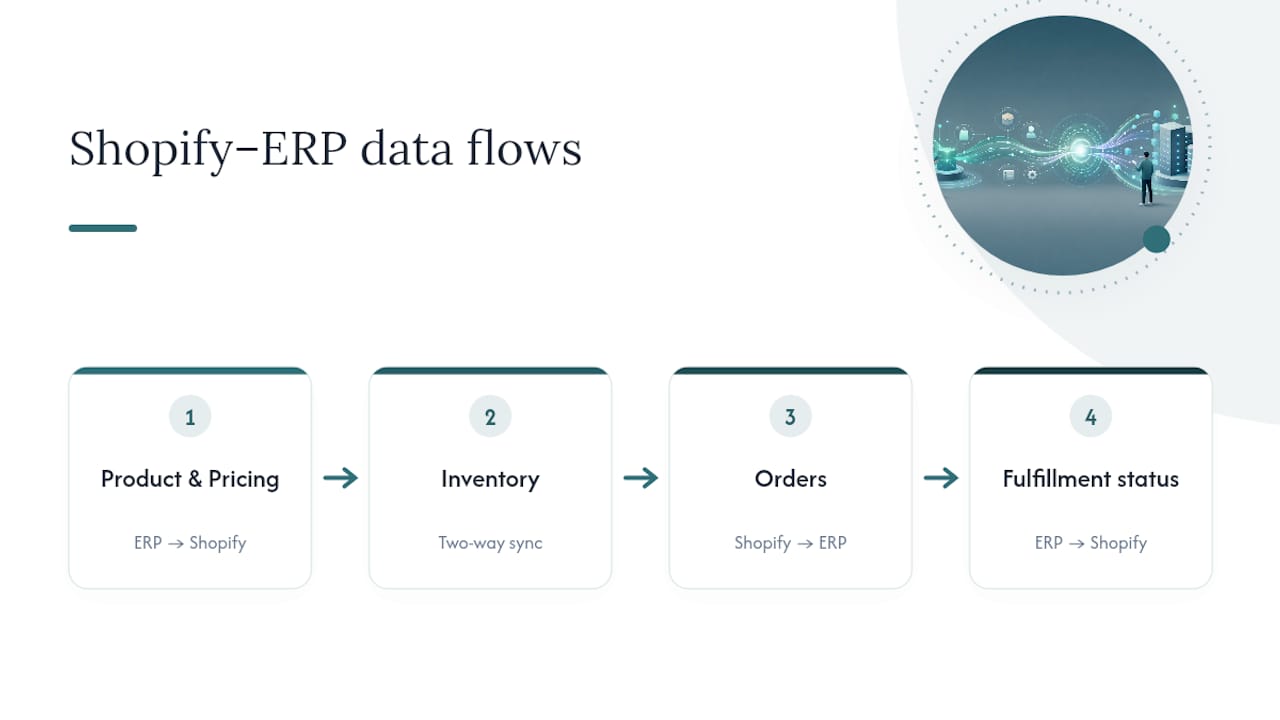
Before you map a single field, decide who owns each piece of data. Product and pricing data usually lives in the ERP as the source of truth, with Shopify pulling updates in. Inventory needs a two-way conversation. Orders flow one way (Shopify to ERP); fulfillment status flows back the other way.
Use the SKU or product code as your canonical key across both systems. This single decision, detailed in Swishtag's field-mapping guidance, prevents the duplicate-record mess that happens when Shopify's internal variant IDs and your ERP's item codes drift apart over time. Normalize variants and metafields early, before your first test order, not after you discover mismatched SKUs in production.
What goes wrong, and how do you prevent it?
Scope creep kills more integration projects than any technical limitation does. A team sets out to sync inventory and orders, then someone adds "let's also pull in loyalty points" and "can we sync gift cards too" mid-build. Lock your core success criteria before development starts, and phase everything else into a second release.
Data quality problems surface the moment two systems start talking. Duplicate customer records, mismatched SKUs, and inconsistent variant naming all look fine in isolation and cause chaos the moment they're forced to reconcile. Build a dedupe pass and a cleansing task into your mapping phase, not as a fix after go-live.
API limits are the quiet failure mode nobody notices until order volume spikes. Shopify's own developer documentation on the Collective integration tutorial recommends queuing requests with backoff and building idempotent writes so a retried request never creates a duplicate order in your ERP. This matters more as volume grows: a connector that works fine at 50 orders a day can hit rate limits at 500.
Security deserves the same discipline you'd apply to your accounting system, because that's effectively what you're connecting to. Practical controls include:
Least-privilege API credentials scoped to only the objects each integration touches
Scheduled credential rotation, not "set it once and forget it"
Secrets stored in a dedicated manager, never hardcoded into connector configs
Separate sandbox and production credentials, so testing never touches live customer data
Pro Tip: Assign one person, not a committee, to own integration alerts. When ownership is shared, failed syncs sit unnoticed for days because everyone assumes someone else is watching the dashboard.
How do you roll out a Shopify ERP integration step by step?
Treat this as a phased project, not a weekend app install. Guides from both Shopify and Swishtag converge on the same core sequence: discover, map, test, pilot, launch, monitor. Skipping a phase to save time almost always costs more time later fixing production errors.
Phase 0: Discovery. Document your current order volume, SLAs for fulfillment, who owns which data today, and every known exception case (backorders, split shipments, international orders). This phase produces the requirements document everything else is built against.
Phase 1: Choose your method and gather access. Decide connector, iPaaS, or custom build based on the checklist above. Then collect API credentials, sandbox environments, and admin access for both Shopify and the ERP.
Phase 2: Build the mapping matrix. List every field that needs to move, its direction, its transformation rules, and its canonical key. Define test cases now, while the logic is fresh, not during testing.
Phase 3: Sandbox and integration testing. Run real test orders through a non-production environment: standard orders, cancellations, refunds, and partial shipments. This is where most mapping errors surface, and it's far cheaper to catch them here than in production.
Phase 4: Pilot. Roll the integration out to a limited set of SKUs or a single location first. Watch inventory accuracy, order sync latency, and error rates closely before expanding.
Phase 5: Production go-live. Cut over fully, with runbooks in place for common failure scenarios and a monitoring dashboard already running, not built after launch.
Before you flip the switch on go-live, confirm each of these:
Rollback plan documented and tested
Support team briefed on what "normal" sync behaviour looks like
Alert thresholds configured, not left at default
At least one full order lifecycle (order, fulfillment, refund) tested end to end
Test cases worth running in sandbox, specifically:
A standard single-SKU order with immediate fulfillment
An order with multiple SKUs shipped from two different locations
A cancellation issued after the order has already synced to the ERP
A partial refund on a multi-item order
A backorder that resolves days after the original order date
Phase: Discovery — Primary goal: Document volumes, SLAs, ownership — Who's typically involved: Ops lead, IT, finance
Phase: Mapping — Primary goal: Define fields, rules, canonical keys — Who's typically involved: IT, ERP admin
Phase: Sandbox testing — Primary goal: Validate logic against real scenarios — Who's typically involved: IT, QA
Phase: Pilot — Primary goal: Confirm accuracy at limited scale — Who's typically involved: Ops, warehouse
Phase: Go-live — Primary goal: Full production cutover — Who's typically involved: IT, ops, support
Most delays in this sequence come from Phase 0 being rushed. Teams that skip discovery to "just get started" almost always end up re-mapping fields mid-build once they discover an exception case nobody documented, like a discontinued SKU still active in one warehouse's ERP record.
How do you keep a Shopify ERP integration healthy after launch?
An integration that works on launch day can quietly degrade over the following months if nobody's watching it. Build a dashboard that tracks sync success rate, average latency between order placement and ERP receipt, and error counts broken down by type (mapping error, API timeout, duplicate record).
Set alerting thresholds that actually mean something operationally, not just technically. A single failed sync at 2 a.m. might not need a page; ten failed syncs in an hour almost certainly does. Define escalation paths in advance so the on-call person knows whether to fix it themselves or wake up a developer.
Watch sync success rate and error type breakdowns daily, not just on incident
Set alert thresholds based on real error clusters, not arbitrary round numbers
Keep a reconciliation and replay tool ready for transactions that failed mid-sync
Review connector and API version changes quarterly, since Shopify and ERP vendors both ship updates that can silently break field mappings
Pro Tip: Build a "replay" button into your monitoring setup from day one. When a batch of orders fails to sync overnight, being able to safely re-push them, without creating duplicates, saves hours compared to manually re-entering each order.
Shopify's Collective integration documentation includes concrete webhook and retry patterns worth reviewing even if you're not building a Collective integration specifically. The rate-limit handling logic applies to any high-frequency Shopify-to-ERP sync.
When does it make sense to bring in an integration partner?
Internal teams hit a wall on Shopify ERP projects for predictable reasons: no spare engineering capacity, business rules too specific for a packaged connector, or a multi-warehouse setup that a standard connector simply wasn't built to handle. If any of those describe your situation, a partner-led build usually gets you to production faster than trying to staff it internally from scratch.
A capable partner typically delivers the full arc: requirements scoping, field mapping, middleware or custom API development, sandbox and pilot testing, and runbooks your support team can actually follow once the integration is live. That last piece matters more than it sounds. An integration with no documented failure procedure turns every sync error into a fire drill.
Coreventra works with merchants on exactly this kind of project, building custom web applications where a packaged connector doesn't fit, and supporting the e-commerce side of the build where Shopify configuration and storefront logic need to align with what the ERP is sending over.
What that looks like in practice:
Requirements scoping that maps your actual order volume and business rules, not a generic template
Field mapping and transformation logic built around your specific ERP, not a one-size-fits-all connector
Sandbox testing against real order scenarios before anything touches production
Post-launch monitoring support so error handling isn't an afterthought
If you're weighing a native connector against a heavier build, it's worth reading how retail and boutique operators approach the same decision, since inventory accuracy pressures often look similar across store sizes even when order volume differs by an order of magnitude.
Why most integration failures are planning failures, not technical ones
Most Shopify ERP integrations don't fail because a connector was buggy or an API had a rate limit. They fail because nobody wrote down the business rules before development started, and the team discovered them one broken order at a time, in production, in front of customers.
The conventional advice treats ERP selection as the hard part: which platform, which connector, which vendor has the best reviews. That's overrated. The genuinely difficult work is field mapping and exception handling, deciding what happens to a backordered SKU, a split shipment, a refund issued three weeks after the ERP already closed the books on that order. Vendors rarely walk you through those edge cases because they're specific to your operation, not theirs.

If there's one thing to prioritize first, it's discovery. Spend real time documenting exceptions before you touch a connector or write a line of mapping logic. Teams that rush this step end up rebuilding mappings mid-project, which costs more time than the discovery phase ever would have.
Coreventra's view: the technology choice matters less than most guides suggest. The scoping discipline behind it matters more.
How Coreventra approaches Shopify ERP projects
If you've read this far, you already know the technology decision (connector, iPaaS, or custom build) is only half the job. The other half is scoping, mapping, and testing done right the first time, and that's where a lot of internal projects lose weeks they didn't budget for.
Integration partners build the pieces that actually make a Shopify ERP integration work in production: custom-built middleware and applications when a packaged connector can't handle your business rules, e-commerce configuration on the Shopify side so storefront data lines up with what your ERP expects, and automation work for the reconciliation and alerting tasks that keep an integration healthy after launch. An initial engagement starts with scoping your specific data flows and exception cases, followed by a concrete plan and estimate before any development begins, so you know the cost and timeline up front rather than discovering them mid-project.
If you're planning a Shopify ERP integration or already stuck mid-build, start with a scoping conversation through Coreventra's e-commerce services page, or browse the full services list to see where custom development or automation support fits your project.
Where to go for deeper technical reference
For the technical detail this guide didn't cover, these sources are worth bookmarking directly:
Shopify's own enterprise guide to ERP integration methods and the Global ERP Program
Shopify developer documentation for webhook patterns, rate limits, and Collective integration builds
Swishtag's implementation guide for high-volume order workflows and phased rollout planning
Uncap's product documentation on embedded, real-time connector architecture
Sources
Shopify ERP Integration for High-Volume Orders: Complete 2026 Guide - Swishtag
Build an ERP integration for Shopify Collective - Shopify Dev
Recommended
E-Commerce for Retail & Boutique Shops
What a Small Retail Store Needs From an Online Store
A Product Photography & Listing Checklist for a New Online Store